

Salesforce used Dreamforce on September 16 to announce AIforce, a new “live interface layer” meant to bring Salesforce data, workflows, business logic, permissions, and governance into the places where people and software agents already work. That matters because it pushes Salesforce beyond the browser tab: instead of asking users to come back to CRM, the company wants Claude, Slack, Lightning, and custom interfaces to come to Salesforce.
The real buyer question is not whether that sounds convenient. It is whether AIforce makes Salesforce a controllable backend for enterprise agents — one that can safely answer questions, update records, and trigger workflows without turning every prompt into an opaque, high-risk integration.
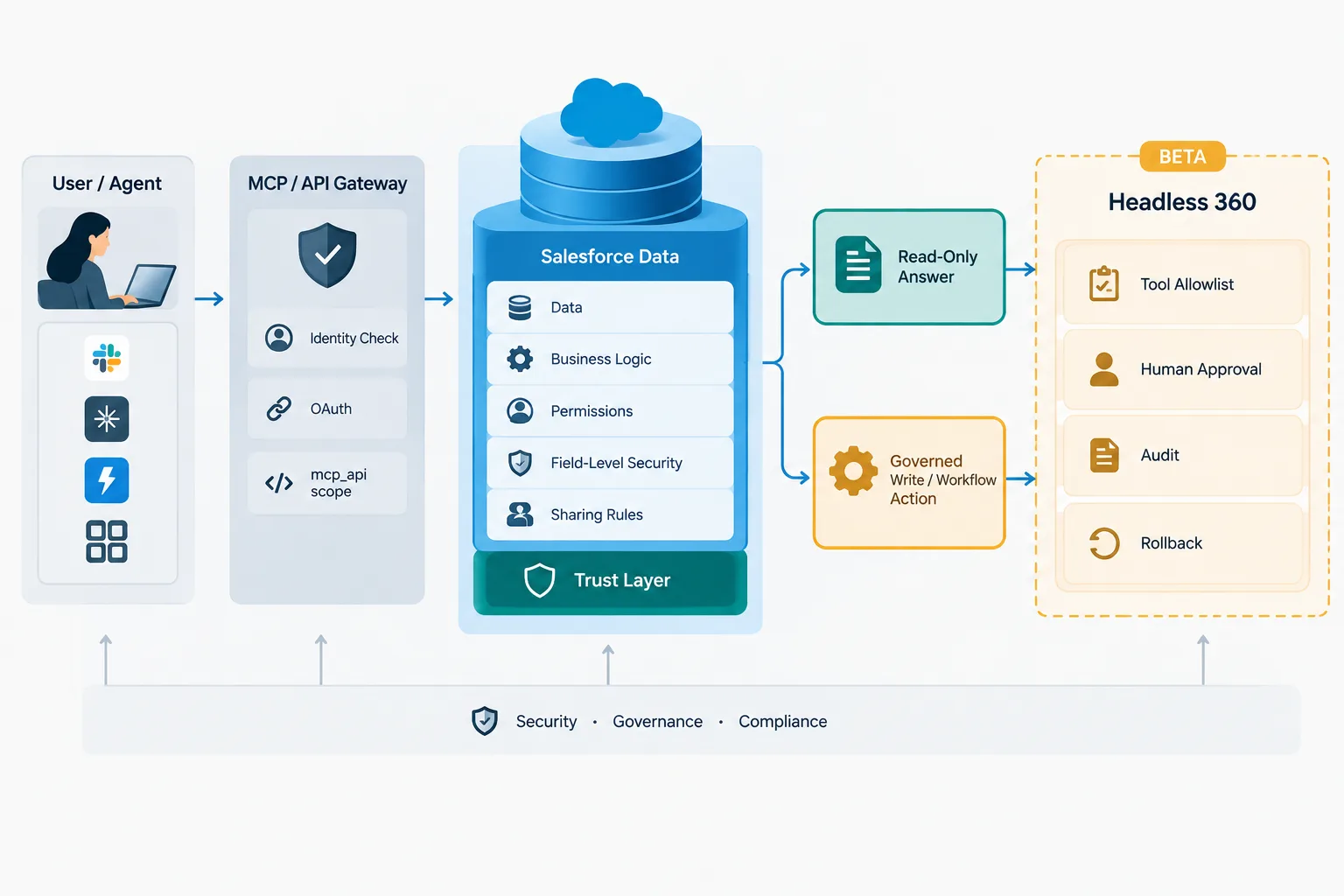
Salesforce’s answer is yes, at least in architecture. The company says AIforce routes requests through its Headless Toolkit, exposing Salesforce capabilities through APIs, Model Context Protocol servers, plug-ins, skills, and developer tools. The launch lineup includes Claudeforce, Slackforce, and Agentforce Coworker. Claudeforce brings Salesforce into Claude with a prebuilt MCP server and 37 prebuilt sales skills; Salesforce also says its Salesforce Development plug-in for Claude Code includes more than 40 skills. Slackforce brings Salesforce context and governed actions into Slack. Agentforce Coworker is an AI teammate inside Lightning, which Salesforce says was activated by 100,000 users in its first 35 days.
That package is best understood as a control-plane move, not just another chatbot feature. Salesforce is trying to keep its data model, semantic layer, workflows, and permission system at the center even when the interface belongs to someone else.
What Salesforce actually launched
The technical spine of AIforce is the same idea that makes the launch strategically important: Salesforce wants its platform to operate headlessly. Its documentation for the Headless 360 MCP Server describes a beta service that lets an authenticated MCP client discover and invoke Salesforce tools over one MCP connection. The four documented tool types are Discover, Describe, Dispatch, and Dispatch (Read-Only).
That matters because the available operations are not trivial. Salesforce documents examples that include querying, creating, and updating records; managing users and permission sets; reading, writing, and deploying Apex triggers; creating named credentials; building event-driven integrations; and managing Commerce Cloud orders. In other words, this is not just a read-only retrieval layer. It can expose real administrative and operational power.
The governance model Salesforce describes is familiar on paper. Requests run as the authenticated user. Object permissions, field-level security, sharing rules, profile permissions, and permission sets still apply. Salesforce also says headless calls route through a Trust Layer, and that business data used to answer a request is not retained by the model provider under its Zero Data Retention positioning.
But buyers should separate what is shipping from what is simply claimed. The Headless 360 MCP Server is documented as beta. Availability varies by region and customer agreement. Packaging can change. Salesforce has not published independent benchmarks for task completion, latency, hallucination rates, or security outcomes, and it has not published a public feature matrix or price sheet for every interface.
Why inherited permissions help — and where they stop
The strongest part of the AIforce story is also the easiest to oversimplify. Inheriting Salesforce permissions is valuable because it means agents do not need a parallel authorization universe for every new interface. If a sales rep can see an account record in Salesforce, the model-driven interface can, in principle, operate with the same record-level, field-level, and role-based boundaries. That is better than rebuilding business logic in a separate agent stack.
It is not, however, the same thing as proving safe autonomy.
A browser UI makes authority legible to a human. A headless interface compresses that authority into tool discovery, connector scopes, identity propagation, prompt handling, action policies, and logging. MCP helps with tool access and discovery, but it does not by itself guarantee least privilege, safe tool selection, sound business logic, or complete audit trails.
Salesforce’s own developer guidance points in the same direction. Administrators are told to restrict tool-level permissions, require approval before changes that alter configuration or data, and test first in a sandbox or Developer org. That advice is especially important because some documented tools touch highly sensitive surfaces such as user administration, permission sets, code deployment, and external credentials.
This is the key operational distinction: inherited permissions are necessary, but not sufficient. A user may legitimately have broad Salesforce access while the agent’s task should be narrow. An external model, MCP client, plug-in, or downstream system can introduce separate risks around prompt injection, retention, incomplete logs, and unintended side effects. “Same permissions model” does not automatically mean the same behavior — or the same observability — across Claude, Slack, Lightning, and a custom app.
The acceptance test before you allow writes
For most enterprises, AIforce looks promising if it is treated as a governed action layer and piloted like one. The practical first step is to start read-only. Verify that the identity path is explicit from the interface to the OAuth-authenticated client to Salesforce, including the required `mcp_api` scope and API version requirements. Then test whether field-level security, sharing rules, and revoked permissions behave as expected in each interface, not just in Lightning.
Next, inspect tool discovery and allowlists. What can the agent see? What can it invoke? Are dangerous capabilities — permission changes, code deployment, external credential creation, deletes, financial or commerce actions — excluded by default, or merely available because the user could theoretically perform them?
Then test side effects and observability. If a workflow fires from Slack, can the team reconstruct who initiated it, what tool was called, what fields were touched, whether an approval checkpoint was skipped, and how to roll the action back? If the same request is issued through Claude and Lightning, do the logs and approval controls look identical enough for audit and incident response?
Only after that should buyers permit writes, and even then with approvals in front of high-impact changes. Salesforce’s own lifecycle guidance — Plan, Build, Test, Deploy, Observe, Extend — is a sensible frame here. The missing discipline in many AI pilots is not access to data; it is evidence that the organization can prove which identity, fields, records, tools, and downstream effects were involved.
Strategically, AIforce is a plausible answer to a real enterprise problem. Companies do not want to rebuild CRM logic for every new agent interface. If Salesforce can let them reuse existing permissions, workflows, and semantics across surfaces, it could cut integration work and keep CRM relevant as the interface layer fragments.
The tradeoff is dependence. The more AIforce succeeds, the more future agent workflows may end up anchored to Salesforce’s APIs, trust boundary, release cadence, and commercial packaging. For CIOs, that is the deeper Dreamforce story. AIforce may indeed make Salesforce a controllable backend for enterprise AI — but only if customers prove, in their own pilots, that control survives contact with real identities, real tools, real writes, and real audits.

 By
By
 By
By
 By
By
 By
By

 By
By
 By
By