

Google Cloud on Sept. 14 said Dataflow now generally supports Pause/Resume for batch jobs and can run on G4 virtual machines with NVIDIA RTX PRO 6000 Blackwell Server Edition GPUs. On paper, that reads like a reliability feature paired with a bigger accelerator. In practice, it is a scheduling change with real consequences for teams running long, expensive AI data pipelines.
The question buyers and operators actually need answered is simpler: does this make large Dataflow-based AI workloads materially cheaper and safer to run, or does it mostly shift the pressure point to GPU supply, quotas, and pipeline design?
The short answer is that it can do both. Pause/Resume gives Dataflow users a way to preserve completed batch progress after failure and to yield GPU-backed capacity from lower-priority work to more urgent jobs. But the feature does not erase the underlying economics of managed pipelines. Costs still depend on how much work was already finished, how much was still in flight, how quickly GPUs can be reacquired, and what else sits on the bill besides the accelerator.
As described in Google Cloud’s product post, the target workloads are long-running batch pipelines that may spend days preparing data, engineering features, running inference, and writing outputs. Those are exactly the jobs where a full restart is most painful.
The new lever is schedulability, not automatic savings
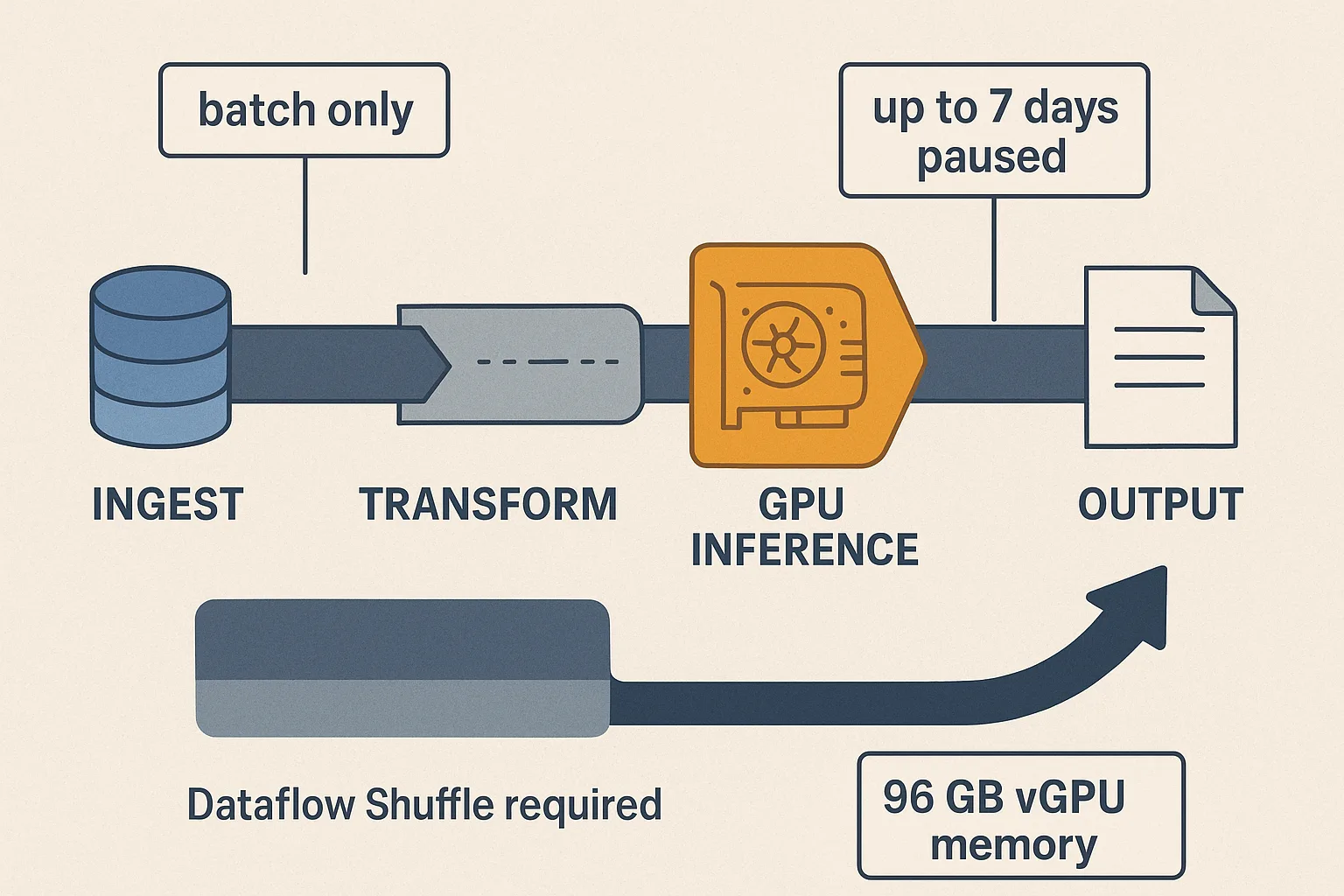
Dataflow is a managed service for batch and streaming pipelines, but this announcement is about batch only. That matters because the value proposition is very specific: if a qualifying batch job fails, a team can resume from preserved progress instead of restarting everything from the beginning.
The qualification rules are not trivial. Google’s documentation says pause-on-failure requires a batch job that uses Dataflow Shuffle and enables the `pause_on_failure` service option. Even then, resumed jobs do not pick up every half-finished task exactly where they left off. Completed work is preserved, but work items that were in progress when the pause happened are reprocessed from the beginning.
That still has real operational value. For a multi-day batch inference run, avoiding a full retry can cut both wasted compute and the engineering delay of rebuilding the job’s completed stages. It also changes incident response. Instead of treating a failure as an all-or-nothing restart, a platform team can preserve what is done, fix the issue, and resume.
The other half of the feature is capacity arbitration. A lower-priority batch job can be paused so its GPU-backed workers are released for a higher-priority job, such as urgent inference or feature engineering. For organizations already constrained by accelerator quotas or limited regional supply, that is often more important than the raw GPU spec sheet. A scarce fleet can serve more business-critical work if long-running background jobs can yield without losing all prior progress.
Where the savings show up—and where they don’t
Google is also adding support for G4 instances with RTX PRO 6000 Blackwell GPUs inside Dataflow. The company says the part offers 96 GB of vGPU memory and 1.6 TB/s of bandwidth, enough to support inference with models of 70 billion parameters or more within Dataflow jobs.
That expands what can plausibly run in a managed data pipeline, especially for teams that want to keep data preparation and inference in the same service. But the announcement should not be read as a blanket promise of cheaper or faster large-model inference. Google has not published independent end-to-end benchmarks for throughput, latency, or total bill reduction. It also does not specify regional availability for the GPU, the workload conditions behind its comparison with NVIDIA L4, or the model sizes and batch shapes used in testing.
The pricing mechanics are also more complicated than a GPU hourly rate. Google’s pricing page lists the RTX PRO 6000 at $1.315 per GPU-hour, plus a separate RTX PRO 6000 Premium line at $0.219 per hour. That is only part of the equation. A Dataflow job can also incur worker, memory, shuffle, disk, and other service charges.
Pause/Resume helps most when the avoided retry cost is high. Imagine a pipeline that spends days transforming data and several more hours on GPU inference. If a failure late in the run would otherwise trigger a full rerun, preserving completed work can save meaningful money and schedule time. But if most failures happen early, or if the expensive stage is usually the one still in progress when the pause occurs, the savings shrink because in-flight work still has to be reprocessed.
There is another limit: pausing is not free. Worker VMs keep billing while they are being deleted. Once the job is fully paused, billing continues for archived Shuffle data. And paused jobs do not live forever. The default maximum pause duration is seven days, configurable from one hour to seven days; after that window expires, the job is canceled within the next hour and cannot be resumed.
Those details matter because they turn Pause/Resume into a cost-control tool only under certain operating conditions. It is best understood as a way to avoid waste at failure boundaries and to improve accelerator utilization, not as a universal discount on AI pipelines.
The bottleneck may move to quotas and pipeline discipline
For many teams, the real operational bottleneck will not be whether Dataflow can pause a job. It will be whether the organization has enough quota and regional capacity to reacquire the right GPUs when it wants to resume.
That is why the most useful pilot is not a synthetic benchmark. It is a workload-level drill. First, verify that the pipeline is batch, uses Dataflow Shuffle, and can enable pause-on-failure. Next, measure how much a restart currently costs: total runtime, expensive stages, frequency of late failures, and how much work is typically in progress at interruption time. Then test the same model and batch shape on RTX PRO 6000 versus the team’s current L4-based setup, because vendor hardware claims do not answer a customer’s throughput-per-dollar question on their own pipeline.
Finance and platform teams should also model the full bill, not just accelerator hours. Add worker, memory, shuffle, storage, and any downstream services. Check quotas and regional availability before assuming that a paused job can resume quickly. If the plan includes using FlexRS for batch work, remember what Google actually documents: roughly 40% discounts on vCPU and memory in exchange for a start delay of up to six hours. That does not establish a 40% savings on GPU-heavy jobs.
The organizations most likely to benefit are the ones with clear priority tiers and observable checkpoints: a backlog of batch jobs, expensive retries, and a reason to preempt one run so another can start now. For those teams, Dataflow’s new features can reduce operational risk and improve GPU utilization. For everyone else, the announcement is still useful—but mainly as a reminder that in managed AI pipelines, the big gains usually come from disciplined workload design and capacity planning, not from a new button alone.

 By
By
 By
By
 By
By
 By
By
 By
By